Friday’s release post introduced the new crash-protection system. This post is the detailed version: why it exists, what it does on the device, and how to turn it on.
The motivation is portability. Every port we add widens the set of platforms an app can break on, and testing across all of them by hand does not scale. The old crash-protection tool emailed you a stack trace; that worked, but it did not symbolicate native crashes, and a busy app could bury you in mail. The new com.codename1.crash package replaces it with something seamless, and the seam it removes is the work you used to do yourself.
Put plainly: once a product ships on several platforms and starts to grow, this is the only practical way to support it in production. Keeping up with crashes from devices you do not own, on operating systems you cannot all reproduce locally, is not realistic without something like it. That is the gap this fills.
Seamless in three ways
You wire up almost nothing. The build servers do the heavy lifting, including the part that used to be impossible from the client: turning a native crash address into a readable stack.
It files GitHub issues, not emails. Crashes land where you already track work, deduplicated, instead of arriving as a stream of messages.
It symbolicates native crashes on every platform we support. Native faults on iOS, macOS, Windows (Win32) and Linux come back as symbolicated stacks, and obfuscated Android exceptions are deobfuscated back to your original class and method names. The cloud build keeps the symbols and applies them server-side, so every platform we ship is covered.
Storage-first delivery on the device
The client is built so that a crash is not lost to a bad network. Every report is written to Storage with a fresh eventId before the upload is attempted, and the stored copy is deleted only after the server confirms receipt with a 2xx. If the device is offline or the upload fails, the report stays in storage and is drained on the next launch; the server deduplicates by the same eventId, so a retry never produces a duplicate.
Symbolication is the half that needs the cloud. After a successful release build, the executor ships the build’s symbol artifacts, mapping.txt for Android or the dSYM for iOS, to the server, which keeps them and applies them when a matching crash arrives. On iOS the existing signal handlers already convert native signals into JVM exceptions that flow through the same error handler, so a native crash and a Java exception travel the same path.
A real native crash, made readable
Here is what that produces. The issue below was auto-filed for a native crash on iOS: a NativeCrash, a Signal 11 (SIGSEGV), the sort of failure that is normally an opaque hex address with nothing to act on. Because the build’s symbols were applied server-side, the issue carries a full symbolicated stack, and you can read straight down it, from the native-interface call that triggered the fault, through the Codename One event dispatch, back to the app code. The header captures what you need to triage without asking the user anything: package, app version, platform and OS version, first and last seen, occurrence count, and a fingerprint that ties recurrences of the same crash together.
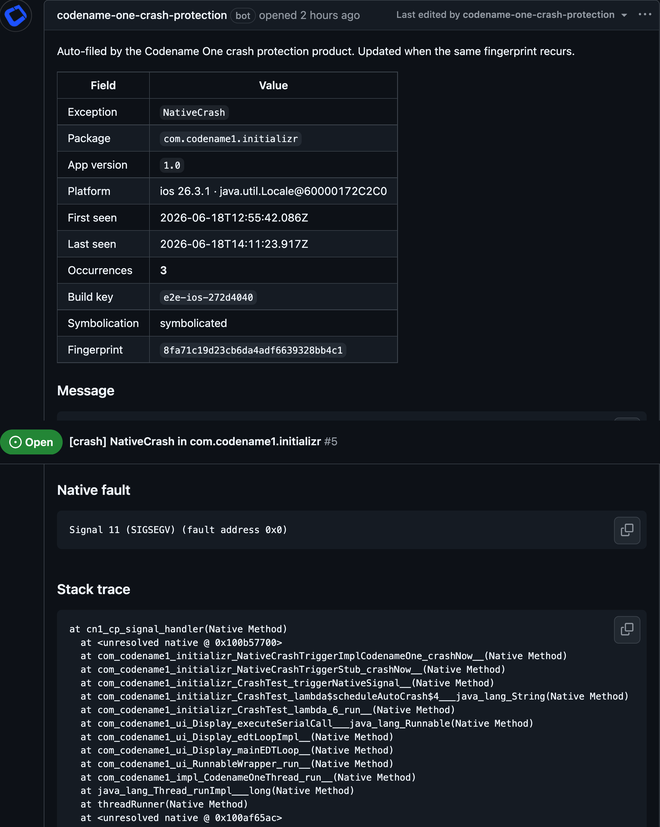
A crash that originates in a native interface is about the hardest case there is, and it still comes back legible. That holds across the ports: native faults on iOS, macOS, Windows and Linux are symbolicated, and obfuscated Android exceptions are deobfuscated to their original names.
Where the issues land: GitHub repo mappings
Crashes are filed as issues on a GitHub repository you choose, and that repository does not have to be the one where your code lives. In the cloud console you map each app package to a destination repo; when a crash arrives for that package, the matching mapping decides which repository receives the auto-filed issue. The crash is filed straight on GitHub as an issue, and Codename One does not store the crash itself.
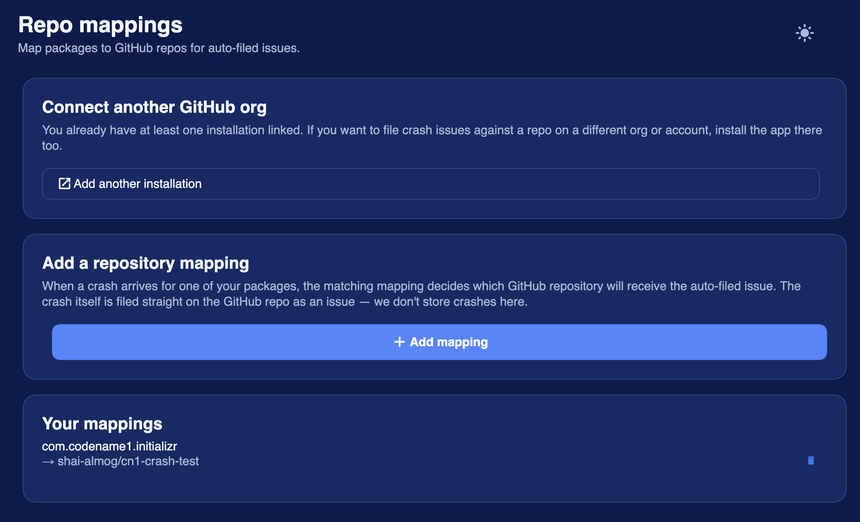
You can connect more than one GitHub organization or account, so crashes can land in a repo on a different org from the one that holds your source. That separation is useful in practice: a private triage repo, a shared support repo, or a per-app repo, each decoupled from where the code actually lives.
Personal data is scrubbed before anything leaves the device
Reports are scrubbed on the device, before the upload, by a PiiScrubber. The defaults are conservative: email addresses are partially redacted, keeping the first few characters of the local part and the full domain (so joe***@example.com), and runs of six or more consecutive digits are collapsed to [num]. URLs are left intact because they are usually needed to understand the crash.
You can extend the scrubber for your own data. Subclass PiiScrubber, override scrubMessage and scrubFrame on top of the defaults, and register it:
public class MyScrubber extends PiiScrubber {
    @Override
    public String scrubMessage(String message) {
        // run the default email/digit rules first, then your own
        String s = super.scrubMessage(message);
        return s.replaceAll("ACCT-\\d+", "[acct]");
    }
}

// during startup, before install()
CrashProtection.setScrubber(new MyScrubber());
Turning it on
Crash protection is opt-in and off by default, and the choice is yours to make: it is persisted in Preferences. Install the handler during startup and enable uploads:
CrashProtection.install();
CrashProtection.setEnabled(true);
install() registers the crash handler and, on the next launch, drains any reports that were stored but not yet uploaded. In the simulator uploads are skipped, so you can call both methods unconditionally without sending test crashes to the cloud. setEnabled(false) stops uploads later without uninstalling.
A few details worth knowing. The endpoint is fixed to the Codename One cloud, so there is nothing to configure there. On Android the new handler runs alongside the legacy Log.bindCrashProtection path, guarded so a bug in one cannot suppress the other, which means you can adopt the new system without losing the old behavior while you migrate.
A note on credentials
Because reports can carry message text, treat the scrubber as part of your security surface. Never put an API key, token or password into a log message or an exception message in the first place: keep credentials out of the binary, fetch them from your own backend, and store them with SecureStorage. The default scrubber redacts common personal data, but it cannot know that a particular string is a secret, so the safe rule is that secrets never reach a log line.
Wrapping up
With more platforms comes a wider testing surface, and this is the tool for dealing with it without adding work to your day: capture on device, scrub locally, deliver reliably, symbolicate in the cloud, and track in GitHub. Turn it on, and if anything about the flow surprises you, tell us on the issue tracker.
Discussion
Join the conversation via GitHub Discussions.