Friday’s release post announced wearable support. This post covers both wearables in detail: how watchOS works, how Wear OS differs, and the small amount of code you write to reach either one.
Why a watch API at all
Apple sees watch programming as a completely separate discipline from phone or desktop programming. It is a different API with a different logic, and that makes some sense given the device. The consequence is that several UI metaphors we take for granted are impractical or absent: there is no text field in the form you expect, and no browser. So it is fair to ask what the point of a watch API even is.
The point is that reuse still happens. Many well known apps simply do not bother with a watch UI because it is such a chore, and yet the amount of work a watch screen actually needs is quite small. It is smaller still with Codename One, because the same Java or Kotlin code base that drives your phone app drives the watch app, and you decide per screen how much of it to show.
watchOS is not iOS
The interesting engineering is on the Apple side. watchOS has no UIKit view hierarchy, no OpenGL ES and no Metal. None of the rendering paths the iOS port relies on exist there. So the watchOS port ships a dedicated Core Graphics rendering backend and a separate watch application target that hosts the Codename One runtime, the ParparVM-translated app, inside a SwiftUI shell. Every drawing operation, rectangles, lines, polygons, images, gradients, Core Text strings, clipping, transforms and alpha-mask shapes, is rendered through Core Graphics. The result is real Codename One UI on the watch:
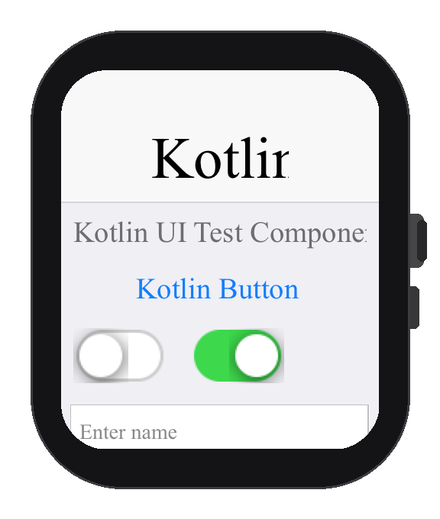
That is a screenshot from our test framework, which was never designed for a watch: it still has a text field. Because that is a Codename One text field it renders correctly and “just works” right up until you try to edit in it, which on a watch would not give the result you want. A UI actually built for the watch would leave the text field out and route input through the watch instead. It is a useful reminder that the same components render here, and that you still design the screen for the watch.
The watch app is rooted in a generated SwiftUI @main shell that hosts the Codename One frames and forwards Digital Crown and tap input into the runtime. On device the watch slice compiles for arm64_32. In the default companion distribution the watch app is embedded in your iOS app so the pair installs together; a standalone distribution builds a watch-only product instead.
The diagram below is the shape of it. CN.isWatch() is true on both wearables, so you adapt the UI for a small screen either way; what differs after that is the platform, not the check.
adapt the UI for a small screen"] B --> C{"Which platform?"} C -->|"watchOS"| D["Watch root + tree-shaking
ParparVM slice (arm64_32)"] D --> E["Core Graphics backend
inside a SwiftUI @main shell"] C -->|"Wear OS"| F["Ordinary Android app
standard Android rendering"]
A separate watch root keeps the app small
The watch has a far smaller memory and CPU budget than the phone, so the less code that reaches it, the better. That is what codename1.watchMain is for. Instead of reusing your phone’s main class, you point the watch build at its own entry class:
codename1.watchMain=com.mycompany.myapp.MyWatchMain
That entry class is the root the build starts from, and changing the root changes what gets compiled. ParparVM only translates the code that is actually reachable from the root it is handed; everything else is dropped (a tree-shaking, or dead-code-elimination, pass). When the watch has its own root, the reachability graph starts from a small watch UI rather than from your full phone app, so the phone-only screens, libraries, and assets the watch never calls fall away before the watch slice is even built. The binary that lands on the device that can least afford the weight is the leanest one. If you do not declare a watchMain, the watch reuses your phone main class and you get the full reachable graph instead.
Wear OS is just Android
The Android side is much simpler, by design. A Wear OS app is an ordinary Android app that declares the watch hardware feature, so the existing Codename One Android port renders the watch UI through exactly the same pipeline it uses on phones and tablets. Almost everything that works on Android works on the watch with no special backend.
What you write
Branch your UI at runtime with CN.isWatch(). This is the wearable analog of the isTablet() and isDesktop() checks you already use:
Form f = new Form(BoxLayout.y());
if (CN.isWatch()) {
    // Compact, single column suited to a small screen
    f.add(new Label("Hi Watch"));
    f.getToolbar().setVisible(false);
} else {
    f.add(new SpanLabel("Welcome to the full size application"));
}
f.show();
A few practical guidelines for the watch branch: prefer a single vertical column that scrolls on the Y axis (the Digital Crown and the Wear OS rotary input scroll the focused container), keep interactive targets large and few, and on round screens keep content away from the corners using the form’s safe-area insets. A watch device can be round or square, so query the insets rather than assuming a rectangle.
Enabling each build
Both builds are additive: with the hints off, your phone builds are byte-for-byte unchanged. On Apple, one hint turns on the watch target, and the cloud build produces the watch slice as part of the regular iOS build:
watchNative.enabled=true
If you want a distinct watch entry point rather than reusing your phone main class, declare it and the watch slice is produced automatically:
codename1.watchMain=com.mycompany.myapp.MyWatchMain
On Android, one hint marks the build as a Wear OS app, which injects the watch hardware feature, declares the app standalone, and raises the minimum SDK to the Wear OS standalone baseline:
android.wear=true
A project can target both platforms at once by setting the watch hint and android.wear=true together.
What runs on the watch, and what does not
Because watchOS lacks UIKit views, GPU rendering and several iOS frameworks, the APIs that depend on them are unavailable on the watch slice. They are guarded so the shared sources still link, and they degrade rather than crash.
| Available on watchOS | Unavailable on watchOS |
|---|---|
| The full UI and layout system | BrowserComponent and web views |
Graphics drawing: gradients, transforms, clipping, Gaussian blur | Camera capture and MediaPlayer video |
FontImage and material icons | Native maps (MapComponent) |
| Images and mutable images | Inline native text editors (text routes through the watch input controller) |
| Networking, storage, JSON and XML | StoreKit in-app purchase |
| The property and binding frameworks |
The watch slice runs the same garbage-collected ParparVM runtime as the iOS app, but the memory and CPU budgets on the watch are far smaller, so keep watch screens light. The generated project is a standard Xcode project, so you can open it and debug or profile the watch target with the native Xcode tools, and cloud builds support the watch target through the same iOS build.
Wrapping up
A watch UI used to be a separate project. Here it is a branch in code you already wrote. This is a new port, so if a screen renders oddly on a real watch or a guarded API behaves unexpectedly, please file it on the issue tracker with the device and watchOS or Wear OS version.
Discussion
Join the conversation via GitHub Discussions.