Yesterday’s release post introduced the new native Linux desktop port. This post is the detailed version: what it is, why the hard parts were hard, and how to build one.
The Linux port is the structural twin of the native Windows port from last week. It is the same idea the iOS port has used for years: ParparVM translates your Java and Kotlin bytecode to C, and the C is compiled and linked into a native binary. On Linux that binary is a single self-contained ELF. There is no JVM on the user’s machine, none bundled, none downloaded, and none required.
What renders it
Where the Windows port uses Direct2D and DirectWrite, the Linux port uses the GTK stack that every Linux desktop already has:
- GTK3, Cairo, Pango and GdkPixbuf for windowing, 2D drawing, text and images.
- OpenGL ES (EGL) for the 3D graphics API.
- GStreamer for media playback, audio recording and the camera.
- WebKitGTK for the
BrowserComponent. - libsecret, libnotify and GeoClue for secure storage, notifications and location, with libcurl for networking.
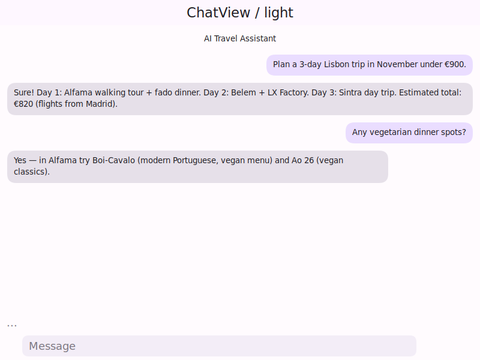
The native layer is real, not a set of stubs: 173 native methods across window, graphics, text, image, networking, sockets, services, text editing, browser, media, peers, GL, and printing. A real Codename One Form app translates to roughly 810 C files and renders 2D, 3D and the bundled material icon font correctly. The optimized build dead-strips code the app never reaches, so a non-trivial app fits in around 5MB, and it starts faster than most of the GNOME native apps already on the desktop. Because the default theme is material design, a plain Codename One app tends to look better than those apps too:
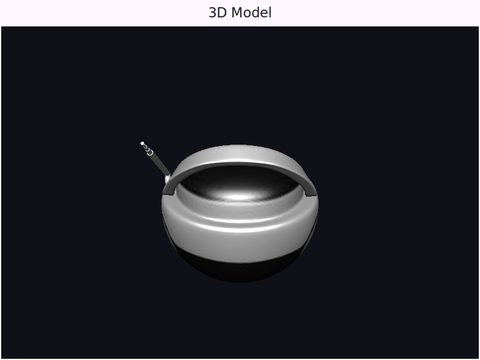
The 3D layer is the same com.codename1.gpu API that renders through Metal on iOS and Direct3D on Windows; on Linux it goes through OpenGL ES. A glTF model loads and renders with its own materials:
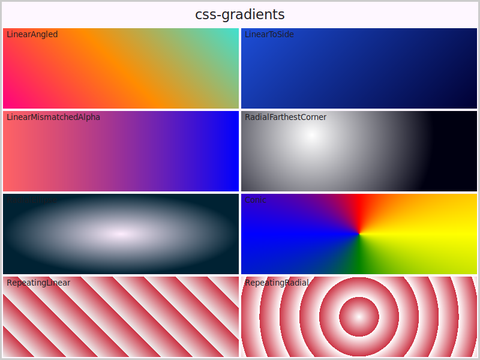
CSS gradients, transforms and the rest of the 2D feature set render through Cairo exactly as they do elsewhere:
The hard part is not rendering
Rendering was the easy part. The two genuinely hard parts of shipping a Linux desktop binary are packaging and dependencies, and they are worth explaining because they shaped the whole design.
Packaging. Linux has many package managers, and supporting all of them well is a project in itself. We did not want to get into that, so the Linux port produces one native binary that the user launches directly, the same model as the Windows port. No bundle directory, no installer required. The app’s resources (the theme .res, images, localization, the icon font) are embedded straight into the ELF and read back at startup.
glibc. This is the single worst thing about shipping a Linux binary, and the only thing worse is the alternative. A binary linked against a new glibc refuses to start on a machine with an older one, and “older” can mean a distribution from last year. The fix is to build against an old glibc, so the resulting binary needs only an ancient, universally present version. We compile against roughly GLIBC_2.17, which dates to 2013, so the ELF starts on essentially any mainstream desktop. GTK3 is linked dynamically and resolved from the system at startup; it has shipped on every Linux desktop since 2011.
resources embedded"] D --> E["x64 or arm64"] F["System libraries:
GTK3, Cairo, WebKitGTK, GStreamer"] -. resolved at startup .-> D
For distributions that use musl instead of glibc, Alpine being the obvious one, musl is an opt-in target where the GTK stack is itself musl-built. A musl binary does not run on glibc distributions and vice versa, so you pick the libc that matches where the app will run.
Building one
Most projects build Linux the way they build every other port: on the build cloud, with nothing to install locally. New projects from the Initializr already carry the Linux build configuration, so the target is there from the first build. If you would rather build on your own machine, the native compile needs the GTK development stack on the build host (the machine that runs the binary only needs the ordinary runtime libraries, which any desktop already has), and you use the local-linux-device target:
mvn -pl common package -Dcodename1.platform=linux \
    -Dcodename1.buildTarget=local-linux-device cn1:build
Both architectures come from build hints. zig is a self-contained cross-compiler, so a single host can build either one:
linux.arch=arm64
linux.arch accepts x64 (default) or arm64, with x86_64, amd64 and aarch64 accepted as synonyms. To target Alpine, switch the C library:
linux.libc=musl
By default the build is optimized and strips symbols so the binary stays as small as the translated code allows. During development you can keep the symbols so a faulting address can be symbolized:
linux.debug=true
Native Linux versus the executable jar
Before this port, the way to run a Codename One app on Linux was to package it as an executable jar that runs on a JVM. That path still exists and still works. The difference is what ships and what the target needs: the executable jar carries Java bytecode and runs on a JVM that must be present, while the native port ships a single ELF that needs no JVM at all. Pick the jar when a JVM is already guaranteed on the target and you want one artifact across desktops; pick the native port when you want a self-contained binary that launches like any other Linux program.
Wrapping up
The native Linux port completes the desktop story the Mac and Windows ports started: the same code base, compiled to a native binary, on all three desktops. It is new, so if you hit a distribution quirk or a dependency that does not resolve, please file it on the issue tracker with the distribution and architecture you saw it on.
Discussion
Join the conversation via GitHub Discussions.